4 groups moved to the Trash
12.8 GB, nothing skipped. Caches refill as apps are used, so clearing them again soon buys little.
Empty Trash nowDone
増え続けるMacアプリのセット
ディスク容量、クリーンアップ、スクリーンショットなどに。アカウント不要、トラッキングなし、ファイルがMacの外に出ることはありません。数週間ごとに新しいアプリが加わります。すべてを手に入れるか、目当ての1本だけを選べます。
アプリ内のアカウント不要15日間の返金保証まずMacから、Windowsは近日対応








ディスク容量アナライザ
ディスク容量の行き先をひと目で確認し、安全に取り戻せます。
| Total | 245 GB |
| Used | 226 GB |
| Free | 19.4 GB |
Matched by content, not by name. One copy of every group always stays.
2 items, gathered from the map and the identical files. Everything here goes to the Trash, so you can put it back.
Macのメンテナンス
Macを良い状態に保ちます。安全に消せるもの、各アプリが実際に使っている容量、今Macが何をしているかがわかります。
412 folders could not be read. That is most of the 1.7 GB above.
In 5 places. Apps rebuild these on their own.
In 31 of 55 projects untouched for 90 days. Active ones are left out.
Real files you may still want. Listed before you tick.
By 9 apps you have already deleted.
412 files not opened or changed since September 2025.
2,321 more live only in iCloud and take no space here, so they are not counted.
24 active projects hold another 8.2 GB. They are not listed as reclaimable, because removing them interrupts work you are doing now.
4 groups from Safe to clear. Everything goes to the Trash, so you can put it back.
12.8 GB, nothing skipped. Caches refill as apps are used, so clearing them again soon buys little.
/Applications/Docker.appThe application itself2.10 GB~/Library/Containers/com.docker.dockerYour data. Tick only if you have nothing in Docker you want to keep19.7 GB~/Library/Caches/com.docker.dockerRebuilt if you reinstall312 MB~/Library/Logs/Docker DesktopDiagnostic logs41 MB~/Library/Preferences/com.docker.docker.plist and 3 moreSettings. Reinstalling starts fresh58 KBPressure is what matters, not how full memory looks. Moderate means macOS is compressing to cope.
Open to your network means anyone on the same Wi-Fi can reach it.
スクリーンショットツール
キーを押して画面の一部を選択し、注釈を加えて、必要な場所に送れます。
Owner: you@example.com. Due Friday.
システムモニタ
Macとその上のすべてのアプリが何をしているかを、現在と過去30日間にわたって確認できます。
Its 14 processes end together and give back 2.3 GB. It asks you to save anything open, as when you quit it yourself.
Memory is tight: Team chat holds 4 times its usual.
スクリーンショットツール
キーを押して画面の一部を選択し、注釈を加えて、必要な場所に送れます。
Owner: you@example.com. Due Friday.
スクリーンショットエディタ
撮ったままのスクリーンショットを、ワンステップで見せられる画像に。メールアドレスなどの識別情報は自動で隠されます。
Open a screenshot, drop it here or paste an image. Hidden areas are burned into the copy.
Open an image PNG, JPEG or WebP. Processed on this computer.Draw a box over anything to hide, or review suggestions from your device.
Find emails and faces0 areas, up to 200 per image
Give the image room to breathe.
画像圧縮ツール
画像をドロップするだけで、小さく、正しいサイズで、正しい名前の書き出しセットが得られます。
Choose JPEG, PNG, WebP, AVIF, TIFF, BMP or still GIF images. HEIC works on macOS.
Set a limit, compare, save new copies.
Choose your settings, then prepare to see each copy and its real size.
Working locally. Your original stays untouched.
0 / 5 processedalpine-lake.jpgJPEG, PNG and WebP keep their format. TIFF, BMP and GIF become PNG. HEIC becomes JPEG. AVIF becomes JPEG.
Linked for each image, never enlarges
Quality is lowered first, for every image together, down to 60%. Only then, if allowed, are images made smaller, never below the smallest long edge.
EXIF, XMP, IPTC, comments and PNG text are left out of new copies. Color profiles stay.
Every image also gets these copies, each with its own size and name. Size limits apply to the main copy only.
Add a copyMeasured file sizes, no image uploads
ディスク容量アナライザ
ディスク容量の行き先をひと目で確認し、安全に取り戻せます。
| Total | 245 GB |
| Used | 226 GB |
| Free | 19.4 GB |
Matched by content, not by name. One copy of every group always stays.
2 items, gathered from the map and the identical files. Everything here goes to the Trash, so you can put it back.
画像圧縮ツール
画像をドロップするだけで、小さく、正しいサイズで、正しい名前の書き出しセットが得られます。
Choose JPEG, PNG, WebP, AVIF, TIFF, BMP or still GIF images. HEIC works on macOS.
Set a limit, compare, save new copies.
Choose your settings, then prepare to see each copy and its real size.
Working locally. Your original stays untouched.
0 / 5 processedalpine-lake.jpgJPEG, PNG and WebP keep their format. TIFF, BMP and GIF become PNG. HEIC becomes JPEG. AVIF becomes JPEG.
Linked for each image, never enlarges
Quality is lowered first, for every image together, down to 60%. Only then, if allowed, are images made smaller, never below the smallest long edge.
EXIF, XMP, IPTC, comments and PNG text are left out of new copies. Color profiles stay.
Every image also gets these copies, each with its own size and name. Size limits apply to the main copy only.
Add a copyMeasured file sizes, no image uploads
スクリーンショットエディタ
撮ったままのスクリーンショットを、ワンステップで見せられる画像に。メールアドレスなどの識別情報は自動で隠されます。
Open a screenshot, drop it here or paste an image. Hidden areas are burned into the copy.
Open an image PNG, JPEG or WebP. Processed on this computer.Draw a box over anything to hide, or review suggestions from your device.
Find emails and faces0 areas, up to 200 per image
Give the image room to breathe.
スクリーンショットツール
キーを押して画面の一部を選択し、注釈を加えて、必要な場所に送れます。
Owner: you@example.com. Due Friday.
パスワードマネージャー
Mac用のオフラインのパスワード保管庫。ホットキー、検索、コピーアイコンだけ。
Every vault locks after a while without use, on sleep and when the screen locks.
Unlock with Touch ID Master password
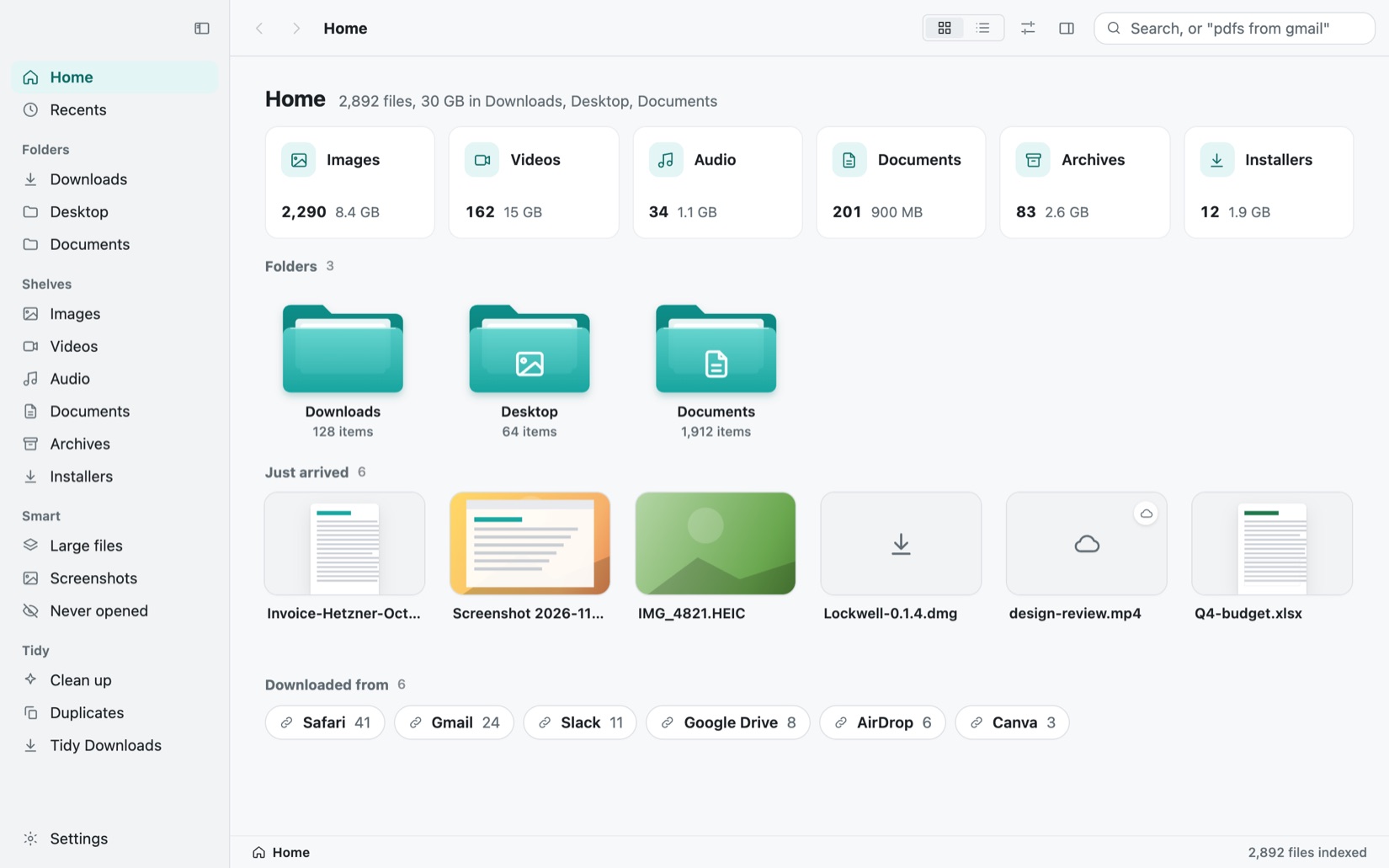
ファイル整理
すべてのファイルを画像で見て、覚えていることから探し出し、ダウンロードをワンクリックで片付けます。

PDFツール
送る前に、PDFの墨消し、署名、縮小、ロック、ページの並べ替えをMacで。
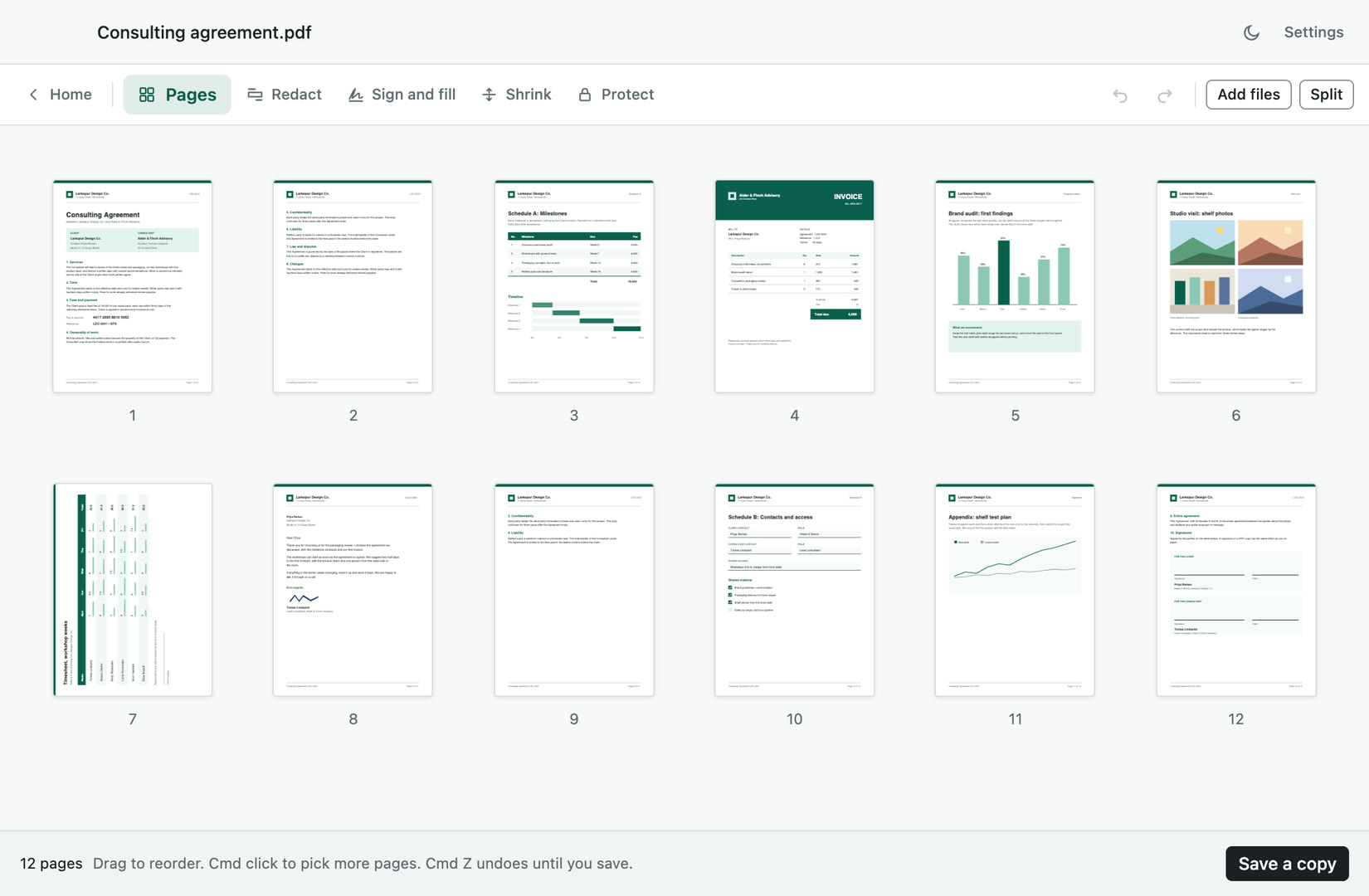
PDFツール
送る前に、PDFの墨消し、署名、縮小、ロック、ページの並べ替えをMacで。
ファイル整理
すべてのファイルを画像で見て、覚えていることから探し出し、ダウンロードをワンクリックで片付けます。
ディスク容量アナライザ
ディスク容量の行き先をひと目で確認し、安全に取り戻せます。
| Total | 245 GB |
| Used | 226 GB |
| Free | 19.4 GB |
Matched by content, not by name. One copy of every group always stays.
2 items, gathered from the map and the identical files. Everything here goes to the Trash, so you can put it back.
Macのメンテナンス
Macを良い状態に保ちます。安全に消せるもの、各アプリが実際に使っている容量、今Macが何をしているかがわかります。
412 folders could not be read. That is most of the 1.7 GB above.
In 5 places. Apps rebuild these on their own.
In 31 of 55 projects untouched for 90 days. Active ones are left out.
Real files you may still want. Listed before you tick.
By 9 apps you have already deleted.
412 files not opened or changed since September 2025.
2,321 more live only in iCloud and take no space here, so they are not counted.
24 active projects hold another 8.2 GB. They are not listed as reclaimable, because removing them interrupts work you are doing now.
4 groups from Safe to clear. Everything goes to the Trash, so you can put it back.
12.8 GB, nothing skipped. Caches refill as apps are used, so clearing them again soon buys little.
/Applications/Docker.appThe application itself2.10 GB~/Library/Containers/com.docker.dockerYour data. Tick only if you have nothing in Docker you want to keep19.7 GB~/Library/Caches/com.docker.dockerRebuilt if you reinstall312 MB~/Library/Logs/Docker DesktopDiagnostic logs41 MB~/Library/Preferences/com.docker.docker.plist and 3 moreSettings. Reinstalling starts fresh58 KBPressure is what matters, not how full memory looks. Moderate means macOS is compressing to cope.
Open to your network means anyone on the same Wi-Fi can reach it.
スクリーンショットツール
キーを押して画面の一部を選択し、注釈を加えて、必要な場所に送れます。
Owner: you@example.com. Due Friday.
画像圧縮ツール
画像をドロップするだけで、小さく、正しいサイズで、正しい名前の書き出しセットが得られます。
Choose JPEG, PNG, WebP, AVIF, TIFF, BMP or still GIF images. HEIC works on macOS.
Set a limit, compare, save new copies.
Choose your settings, then prepare to see each copy and its real size.
Working locally. Your original stays untouched.
0 / 5 processedalpine-lake.jpgJPEG, PNG and WebP keep their format. TIFF, BMP and GIF become PNG. HEIC becomes JPEG. AVIF becomes JPEG.
Linked for each image, never enlarges
Quality is lowered first, for every image together, down to 60%. Only then, if allowed, are images made smaller, never below the smallest long edge.
EXIF, XMP, IPTC, comments and PNG text are left out of new copies. Color profiles stay.
Every image also gets these copies, each with its own size and name. Size limits apply to the main copy only.
Add a copyMeasured file sizes, no image uploads
システムモニタ
Macとその上のすべてのアプリが何をしているかを、現在と過去30日間にわたって確認できます。
Its 14 processes end together and give back 2.3 GB. It asks you to save anything open, as when you quit it yourself.
Memory is tight: Team chat holds 4 times its usual.
パスワードマネージャー
Mac用のオフラインのパスワード保管庫。ホットキー、検索、コピーアイコンだけ。
Every vault locks after a while without use, on sleep and when the screen locks.
Unlock with Touch ID Master password スクリーンショットエディタ
撮ったままのスクリーンショットを、ワンステップで見せられる画像に。メールアドレスなどの識別情報は自動で隠されます。
Open a screenshot, drop it here or paste an image. Hidden areas are burned into the copy.
Open an image PNG, JPEG or WebP. Processed on this computer.Draw a box over anything to hide, or review suggestions from your device.
Find emails and faces0 areas, up to 200 per image
Give the image room to breathe.
クリップボードマネージャー
コピーしたものはすべて保存され、キー操作ひとつで見つかり、作業中の場所にペーストできます。
Monday: final builds signed and notarized.
Ship the release notes by Friday.
Wednesday: invoices out to the two design partners.
Invoice #2041
Due 30 October
Total 1,240.00
すべてをそろえるか、お気に入りのアプリだけにするか。購入したアプリはずっとあなたのものです。
Windows
ほしいアプリを教えてください。準備ができたら一度だけメールでお知らせします。
初期購入者特典
3ステップ、アプリ内のアカウントは不要です。
あなたのファイルはあなたのもの
アプリ内で登録するものはありません。各アプリは何を送信するかを正確に示します。
50%返金
購入したDeskworthyアプリについて動画やスレッドを投稿してください。下の再生数に達したら、代金の半額または全額を返金します。アプリはそのまま使えます。
どのアプリでも、All Appsでも。
YouTube、TikTok、Reels、Shorts、X、Threads。
購入時のメールアドレスから送ってください。再生数を確認して返金します。
| 投稿先 | 50%返金の条件 | 100%返金の条件 |
|---|---|---|
| 動画:YouTube、TikTok、Reels、Shorts | 5,000回再生 | 20,000回再生 |
| テキスト:X、Threads | 10,000回再生 | 50,000回再生 |
1回の購入につき1回まで申請できます。All Appsの購読者には同じ価値の無料期間を提供します。詳しいルール。
AIに質問するChatGPTClaudePerplexityGoogle AI ModeGrok
ほかにご質問は?support@deskworthy.appまでメールでお問い合わせください。
いいえ。ライセンスキーがメールで届くので、それをアプリに貼り付けるだけです。このウェブサイトのアカウントは、請求書、デバイス、ロードマップへの投票のためだけのものです。
ほとんどのアプリは7日間無料で、すべての機能を使えます。コンピュータ1台につき1回、カード登録は不要です。DiskAtlasとKemptはスキャンがいつでも無料で、クリーニングにはライセンスが必要です。また、どの購入も15日以内なら返金できます。
いいえ。購入したアプリは、All Appsを入手するかどうかにかかわらず、今後のすべてのバージョンを含めてずっとあなたのものです。
All Apps、および各アプリの最初の購入者は、より安い価格と永久アップデートを受けられます。カウンターは実際の販売数を表示しています。
どの購入も最大2台のコンピュータで使えます。今はMac、Windowsはリリース後に対応します。ライセンスはアカウントから新しいコンピュータに移せます。
買い切りで購入したアプリはそのまま使えます。All Appsで入手したアプリは支払い済み期間の終了時に使えなくなり、設定はコンピュータに残ります。
プライバシーを重視した小さなMacアプリのコレクションで、今も増え続けています。どのアプリも1つの仕事だけをこなし、アカウントは不要で、ファイルはMacから出ません。必要なアプリを買うことも、現在と今後のすべてのアプリを手に入れることもできます。
macOS 13以降の、AppleシリコンとIntelのMacで動きます。どのアプリも1つのユニバーサルビルドで、どちらでもRosettaなしでネイティブに動作します。最低要件は各アプリのページに記載しています。
各アプリは起動時と1日1回アップデートを確認し、新しいバージョンをバックグラウンドでダウンロードして「再起動してアップデート」を表示します。アプリを終了したときにもインストールされるので、作業が中断されることはありません。どのライセンスでも今後のすべてのバージョンを使えます。
はい。どのアプリも最初は「安定版」チャンネルです。「設定、アップデート」で「ベータ版」に切り替えると、全員に届く前に新しいバージョンを受け取れます。
ファイル、ファイル名、アプリが読み取る内容は一切送信しません。アプリが行うのは、アップデートの確認、ライセンスの確認、そして「無料トライアルを開始」をクリックしたときのトライアル開始だけです。「設定、ネットワーク」には行う可能性のあるすべての通信が一覧表示され、オフにすることもできます。
いいえ。アプリには分析機能がなく、クラッシュレポートも送信しません。このウェブサイトは独自の分析で訪問数を数えていますが、Cookieは使いません。オプトアウトの方法はプライバシーページに記載しています。
はい。どのアプリもAppleによる署名と公証を受けています。ディスクイメージを開き、アプリをアプリケーションにドラッグすれば、以降は自動で最新の状態に保たれます。
はい。単体アプリでもAll Appsでも、どの購入も15日以内なら理由を問わず返金できます。購入時のメールアドレスからsupport@deskworthy.appまでご連絡ください。
購入したDeskworthyアプリについて動画やスレッドを投稿してください。50%返金ページに記載の再生数に達したら、半額または全額を返金し、アプリはそのまま使えます。All Appsの購読者には同じ価値の無料期間を提供します。
購入時のメールアドレスで、このウェブサイトのアカウントにサインインしてください。キーが一覧表示され、メールで再送することもできます。
アプリの「設定、ライセンス」またはアカウントから古いコンピュータを解除し、新しいMacのアプリにキーを貼り付けてください。
現在と今後のすべてのDeskworthyアプリと、そのアップデートです。新しいアプリはリリースされ次第加わるので、追加で買うものはありません。
特定のアプリが1本か2本あればよいなら、アプリを買い切りで購入してください。今後のすべてのバージョンとともにずっと使えます。3本以上のアプリを使う場合や、新しいアプリが出るたびに試したい場合はAll Appsが向いています。
Windows版は近日公開予定です。お持ちのライセンスで使えるので、二重に購入する必要はありません。
